The BackflowGo User Guide
Everything the software does, in the order you’ll actually use it. Every screenshot is the real product; every video is a real screen recording. Prefer paper? Download the printable field guide (PDF).
Contents
- Getting started: your tester profile
- Customers & assemblies (or import your whole book)
- Recording a test in the field
- The Review Queue — and fixing mistakes
- Submitting to purveyors: email, portals, and what the labels mean
- The official forms (17 state forms, 13 on the official PDF)
- Invoicing, QuickBooks export, customer reports
- Scheduling & automatic reminders
- Crew accounts, roles, and price hiding
- FAQ — with videos
1. Getting started: your tester profile
Sign up at backflowgo.com, then open Settings before anything else. Your tester profile is what prints in the certification blocks of every official form: your name, license/certification number and its expiry (and the state that issued it), your test-kit make, serial and calibration date, your company details, and your signature (draw it once on the signature pad; it’s embedded on every report you file).
This isn’t busywork — Submit refuses to file a report with a blank license, a missing signature, an expired gauge calibration, or an expired license, because a purveyor clerk would bounce it and some jurisdictions treat it as void. Fill the profile once and never think about it again. If your license state differs from the state you’re filing in, Submit warns you (certifications are state-specific; reciprocity varies).
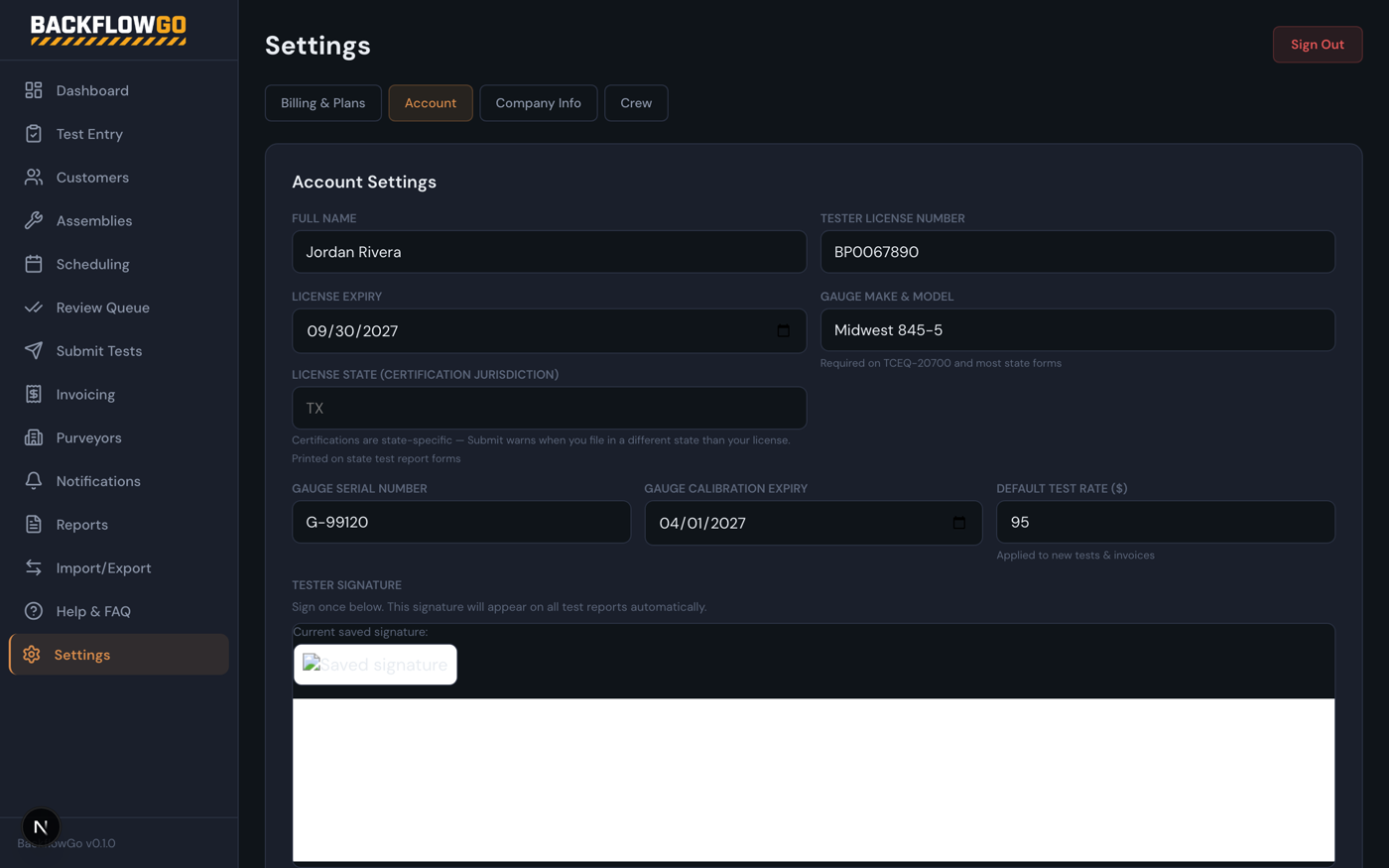
Settings → the tester profile that feeds every official form.
2. Customers & assemblies
Coming from Syncta (or a spreadsheet)?
Import/Export → Import. Export Customers, Devices, and Test History from your old system as CSV and import them here in that order — each step links to the previous one, missing records are created automatically, and duplicate serials are skipped. Column names don’t need to match; we recognize Syncta’s headers and most spreadsheet variants. After the assembly import, BackflowGo matches your imported purveyor names against the national directory and links them so submission routing works on day one; anything ambiguous is left for you to pick manually (it tells you how many).
The Import/Export page: Syncta migration in three CSVs, plus exports for customers, tests, assemblies, and QuickBooks-ready invoices. (Real screen recording — no mockups.)
Adding by hand
Customers holds the property owners you bill; each customer carries a default water purveyor (learned automatically from the first test you record there). Assemblies are the physical devices — type, make, model, serial, location on the property, and (for portal-routed purveyors) the portal’s own reference number. You rarely need to pre-create assemblies: recording a test with a new serial creates the assembly for you.
3. Recording a test in the field
A complete test, customer to save, in about 30 seconds. (Real screen recording — no mockups.)
Test Entry is a four-step wizard designed for a phone in a mechanical room:
Step 1 — Customer & purveyor
- Pick the customer (type-ahead search). Their address and default purveyor fill in automatically.
- Detect purveyor from my location — stand at the device, tap once, and BackflowGo runs your GPS position against 44,192 real water-district service-area boundaries and tells you exactly who you file with. Near a district line it shows the candidates and distances so you pick the right one.
- Or search the 49,645-purveyor directory by name. The search is scoped to your customer’s state (tap “search all states” to widen), and verified purveyors — the ones with confirmed submission channels — sort first.
GPS purveyor detection — point-in-polygon against real service-area boundaries. (Real screen recording — no mockups.)
Step 2 — Assembly
- Existing devices show as a picker (location, type, serial) — tap to auto-fill. New device? Enter it once; it’s saved to the customer for next year.
- All device families: RP, DC, PVB, SVB, and fire-line detectors (RPDA/DCDA) with full Type I / Type II bypass support — bypass identity, its own readings, and the correct handling on the official form (Texas Type I detectors get their required second form page automatically).
- If the purveyor files through a portal (BSI, EnviroTrax, etc.), a field appears for the portal’s reference number (rolling out with the next database update) — the BSI CCN from the customer’s notice letter, VEPO’s VCC, Tokay’s building number. Capture it once and every future re-key sheet leads with it.
Step 3 — Readings
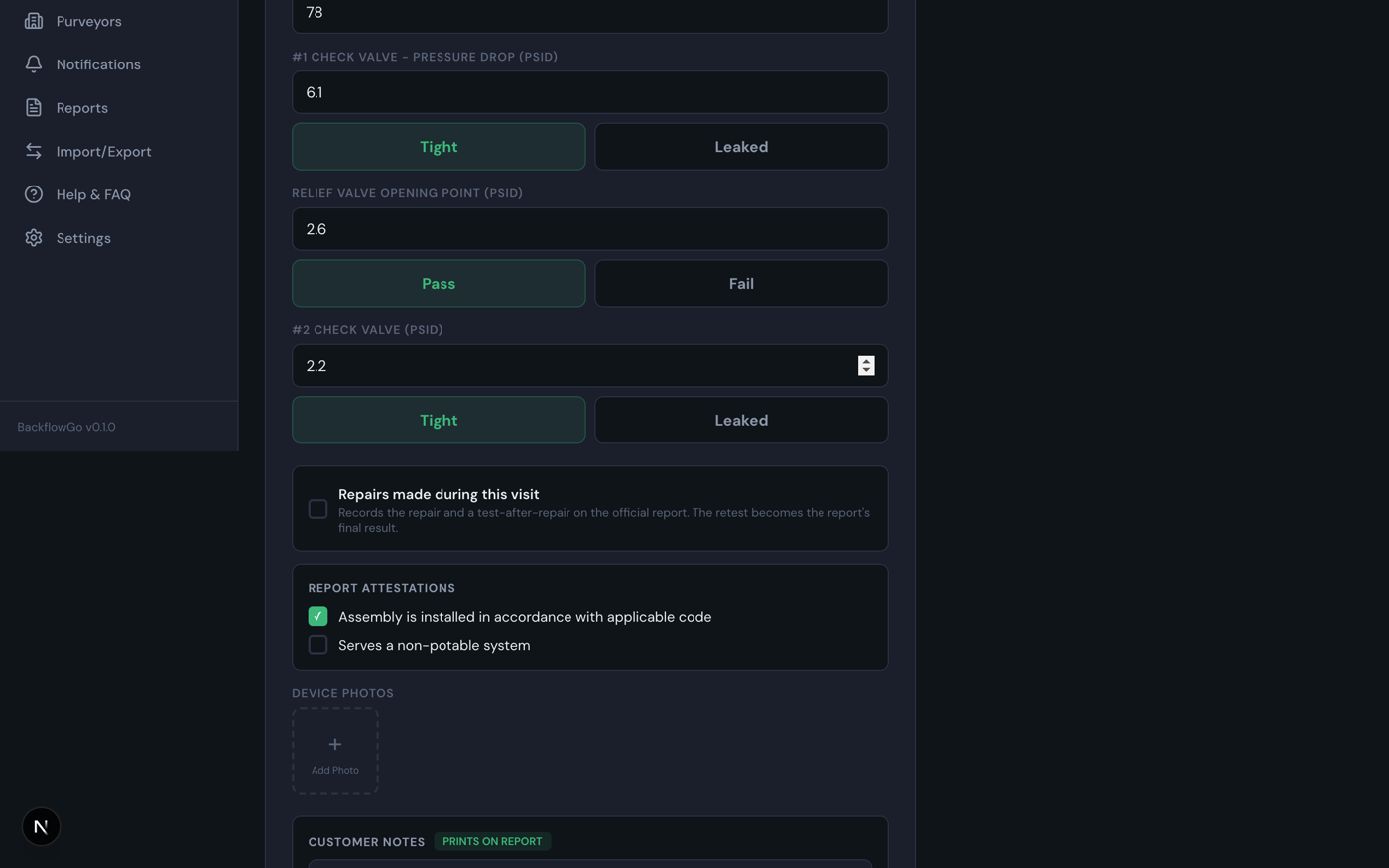
Readings with numeric keypads, tight/leaked toggles, repairs, attestations, and photos.
- The test date/time defaults to now but is editable — evening catch-up entry keeps the real test date on the legal record.
- Fields adapt to the device: checks + relief for RP, checks for DC, air inlet for PVB/SVB, bypass rows for detectors.
- Repairs made during this visit records the repair narrative and a test-after-repair; the retest becomes the report’s final result while the initial readings stay on the initial rows — exactly how the state forms expect it.
- Attestations (installed per code, serves non-potable) are your actual answers, never app defaults pretending to be answers.
- Photos: shot from the camera, automatically downscaled so your data plan and the app stay fast.
- Sanity warnings catch implausible readings (a “tight” check under 1 PSID, relief opening above the #1 hold, missing required readings) — they warn, never block, and the Save button tells you how many you’re accepting.
Step 4 — Review & save
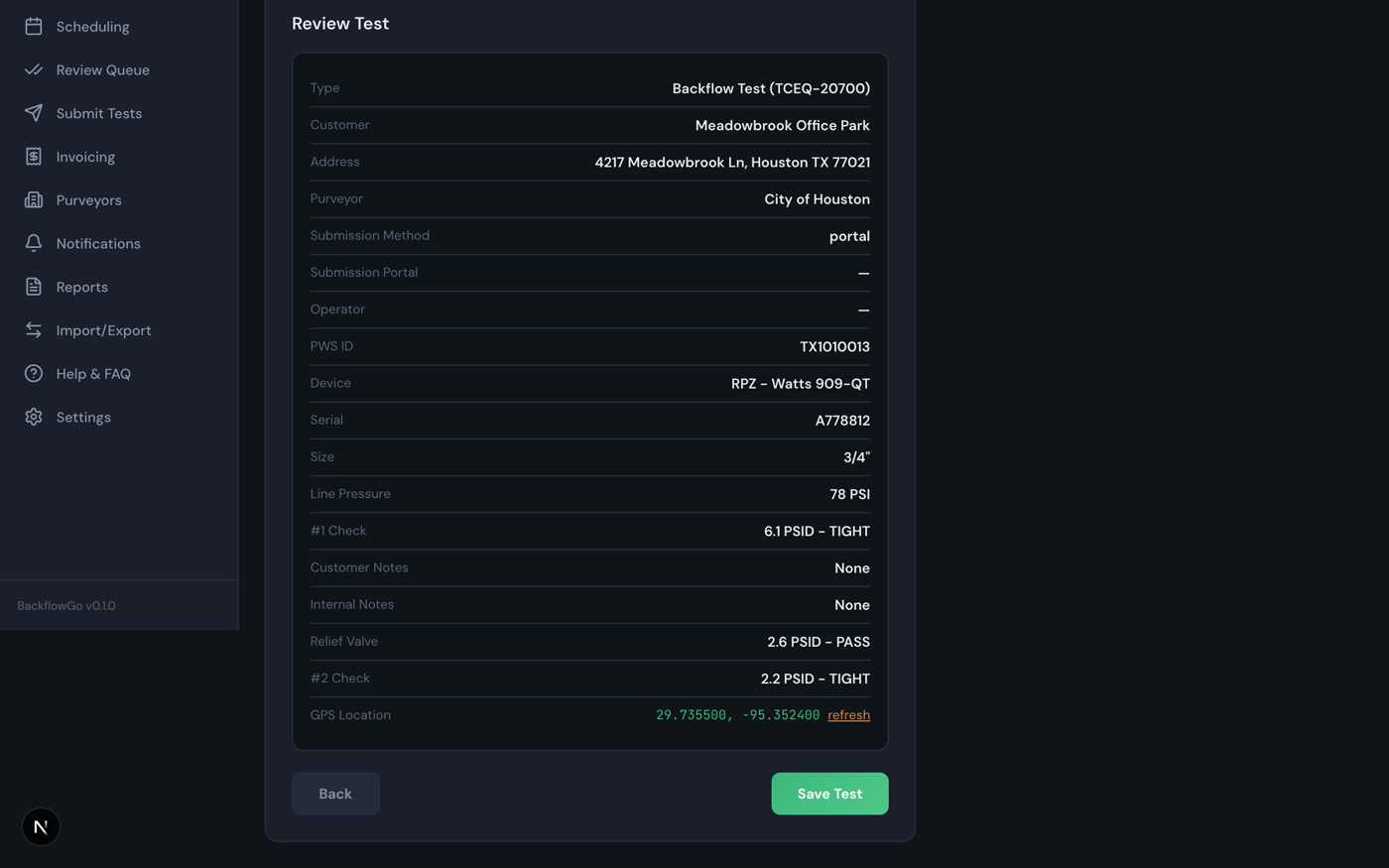
Everything on one screen before it becomes a record.
Your work survives dead zones. Every keystroke is mirrored to a local draft on the phone. Lose signal at Save, fat-finger the navigation, or have the browser evict the tab — come back and a “Resume unsaved test?” banner restores everything (photos excluded). If a save fails, your entries stay on screen and in the draft; hit Save again when you have bars.
4. The Review Queue — and fixing mistakes
Nothing files without an approval. (Real screen recording — no mockups.)
Every saved test lands in Review Queue as pending. An admin approves it (or denies it), and only approved tests can be submitted. Typed a 57.1 that should have been 7.1? Edit reopens the saved test in Test Entry, pre-filled; the correction is audit-stamped (who, when — rolling out with the next database update) and goes back through review. Tests that have already been submitted to a purveyor can’t be edited — file a corrected report instead, like the paper world.
5. Submitting to purveyors
One tap dispatches every approved test, grouped by purveyor, and reports honestly what happened to each. (Real screen recording — no mockups.)
Submit Tests groups your approved tests by purveyor and dispatches each group by that purveyor’s actual submission channel. The dispatch report tells you the truth about every group:
- EMAILED — the purveyor accepts email; we rendered the correct official form PDF and sent it, with your company as reply-to. About 15,000 purveyors are email-dispatchable today. If the address is the EPA-filed contact of record rather than a hand-verified submissions inbox, the report says “delivery unconfirmed” — and if it ever bounces, the affected tests automatically resurface as pending instead of silently pretending they filed.
- MANUAL — the purveyor mandates a portal (SwiftComply, BSI Online, EnviroTrax, Tokay…). You get the portal link, the vendor’s real fee and deadline notes, and a re-key sheet: one page per test with every value the portal will ask for, in entry order, portal reference number first. No portal offers testers an upload or API — so we make the re-key as fast as it can honestly be.
- BLOCKED — something would make the filing void (incomplete tester profile, expired gauge calibration, expired license). It tells you exactly what to fix. This is a feature: a bounced filing looks worse in front of a clerk than a blocked one.
Once a test is submitted it’s marked immediately — a retry or a double-tap can never send a purveyor duplicate filings under your license.
6. The official forms
BackflowGo renders 17 dedicated state forms — 13 of them stamped on the actual official government PDF — Texas TCEQ-20700 (detector-aware, including the Type I second page), New Jersey’s mandated BWSE-CITR-IQ (quarterly regime), New York DOH-1013 and NYC’s GEN215B (borough-detected automatically), Washington, Indiana 55788, Wisconsin SBD-9927, the Massachusetts MassDEP pair, Missouri, Ohio, Tennessee, South Carolina, West Virginia, Michigan, and the published templates for Virginia, Colorado, and North Dakota (those four states mandate no form; theirs are faithful recreations of the published templates, not the official PDF). Everywhere else gets a clean USC/AWWA-style report that’s legally correct in purveyor-driven states — plus an honest, sourced warning wherever a jurisdiction has quirks (Mississippi’s unpublished mandated form, Wisconsin’s DSPS filing, Guam’s approved-tester list…). The PDF you download is byte-identical to the PDF we file. Browse how any of the 49,645 purveyors takes submissions in the free purveyor directory.
7. Invoicing, QuickBooks, customer reports
- Invoicing builds invoices from your tests at your default rate (set in Settings), tracks sent/paid, and — when online payments are enabled — gives customers a hosted card checkout.
- Import/Export → Invoices CSV is shaped for QuickBooks Online’s invoice import, so your bookkeeper never re-keys.
- Email report to customer (from the Review Queue) sends the property owner the same official PDF that was filed, with a permanent tokenized link (rolling out with the next database update) so they can re-download their proof of compliance anytime without an account.
8. Scheduling & automatic reminders
Every saved test stamps the assembly’s next-due date a year out. Scheduling shows what’s coming due; the reminder engine emails your customers automatically at 30, 14, and 7 days before due (then weekly when overdue), one consolidated email per customer, plus gentle nudges on unpaid invoices. Every send is logged in Notifications; nothing is ever claimed “sent” that wasn’t.
9. Crew accounts & roles
Settings → Crew: invite field testers by email. Testers record tests and download their copies; they don’t see prices, invoicing, or revenue, and they can’t approve or submit — that’s enforced on the server, not just hidden in the UI. Admins review, submit, invoice, and manage the crew.
10. FAQ
Quick answers
Does it work offline? Drafts save locally as you type, so a dead zone can’t destroy an entry, and failed saves keep everything on screen for retry. A full offline mode with queued sync is the current top of the roadmap.
What does it cost? Free during early access — up to 3 filed reports a month stays free after that; unlimited is $49/month flat. No per-test fees, ever. (Portals charge their own tester fees; nobody’s software can remove those — we publish them honestly instead.)
Is my data mine? Yes — export customers, tests, assemblies, and invoices as CSV any time, no support ticket required.
What happens when a purveyor’s email bounces? The affected tests automatically flip back to pending and the purveyor is marked so nobody keeps emailing a dead inbox. You’ll re-file by portal or a corrected address — but you’ll know.
My purveyor demands its own PDF form. Send it to us — we map it once (rolling out with the next database update), and from then on your tests render on the purveyor’s own form automatically (this never overrides a state-mandated form).
Where does the purveyor data come from? EPA’s SDWIS federal registry, cross-verified against live EPA records, plus hand research and portal-vendor rosters — and corrections from working testers, each verified before it changes the directory.
Still stuck? Every email gets read by the founder. And if this guide missed something, that’s a bug — tell us.